Who the asset register is for, and who needs a dedicated tool
For companies that have lost a laptop or two and want to know what they own, where it is and who has it.
A good fit if
- Companies with 20 to 500 employees and a few hundred laptops, phones, tools or vehicles
- HR and admin teams that hand out equipment and need it back at exit
- Businesses with more than one office that want one register
- Teams already using EzNxT HRMS, so assignments map to real employees
- Companies whose auditor asks for a fixed asset list every March
Look elsewhere if
- Businesses that need depreciation calculated and posted inside the software
- Warehouses that need barcode scanning, stock counts and reorder points
- Fleet operators who need GPS or IoT tracking of equipment
- Companies that need preventive-maintenance schedules with automatic work orders
What can EzNxT Asset Tracker do for an admin team?
A register, a custodian for each item, and the numbers the auditor asks for.
The asset register
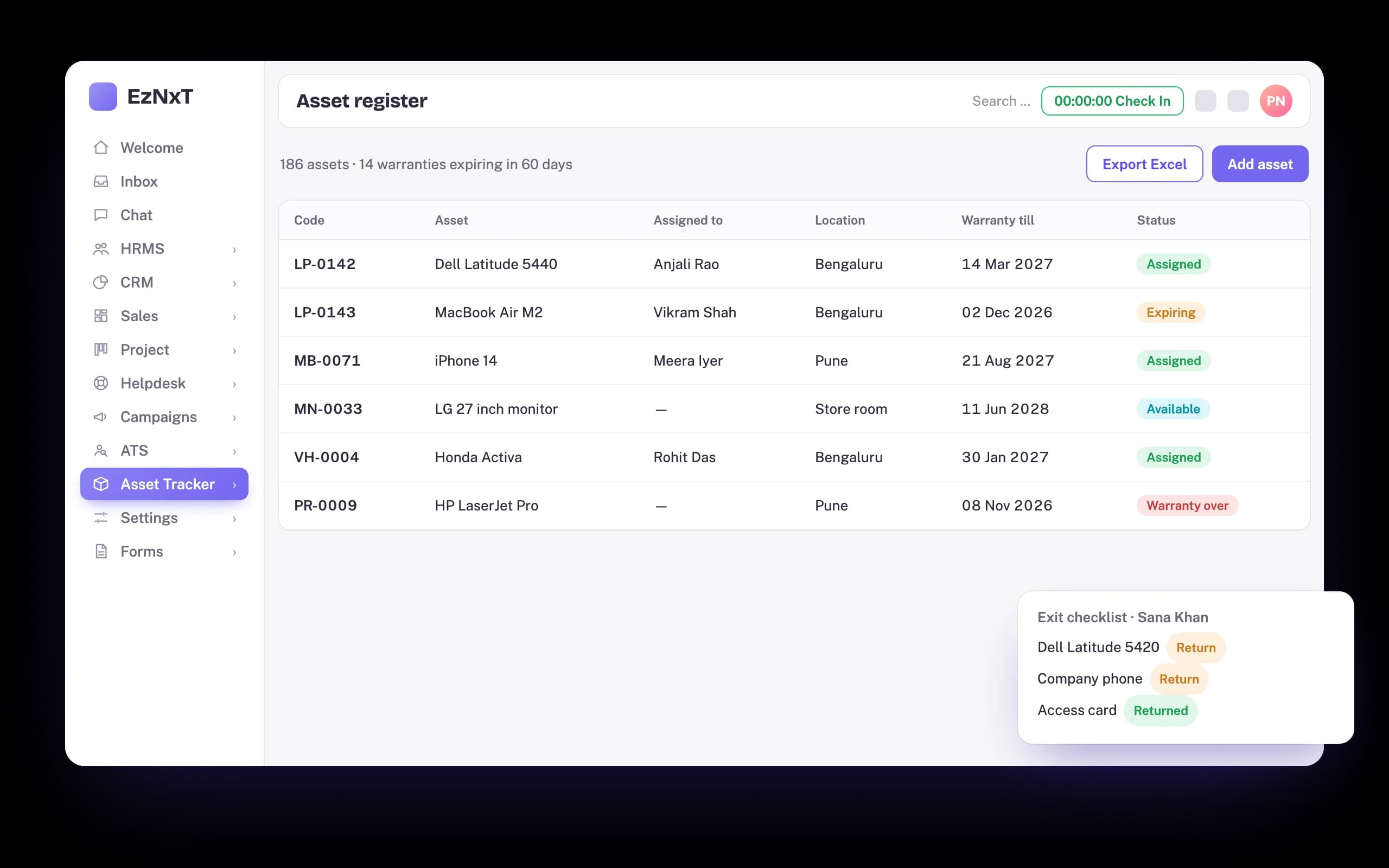
One record per asset with everything the invoice and the label say, and the invoice itself attached.
Asset code and serial number
Your own code series plus the manufacturer’s serial, both searchable.
Category, brand, model, size, colour
Enough detail to tell two black laptops apart without opening them.
Purchase cost and date
What it cost and when, with the purchase invoice attached, for the fixed asset list.
Warranty and maintenance dates
Warranty expiry, last service and next service dates, filterable across the whole register.
Office, site and department
Where it lives now, and a move is a reassignment with a note.
Assignment and return
Every asset has a custodian, and the custodian is a real employee record.
Assign to an employee
Pick the person from HRMS, add the date and a note. Status moves from Available to Assigned.
Return with condition
Record the return date, the condition and any notes. A cracked screen is on the record, not in someone’s memory.
Assignment history
Every custodian the asset has had, with dates, on one screen.
Exit checklist view
An employee’s assigned assets on their profile, so HR knows what to collect.
Tags and attachments
Tag assets (loaner, client-site, leased) and attach photos or documents.
Vendors, dashboard and export
The people you bought from, the numbers you report, and the Excel you hand over.
Vendor records
Name, contact person, phone, email and address, linked to the assets bought from them.
Dashboard
Assets by status and category, assigned value against available value, at a glance.
Excel download
The whole register, or a filtered slice, as Excel for the auditor or the insurer.
Role-based access
Admin edits, managers view their department, everyone else sees only what is assigned to them.
Building the register in an afternoon
Five steps. Most of the time goes into finding the serial numbers.
- 1
Set categories and locations
Laptops, phones, furniture, vehicles, tools. Offices or sites, and departments, so each asset has a home.
- 2
Add vendors
Name, contact person, phone, email and address. Useful when the warranty claim comes up two years later.
- 3
Register the assets
Asset code, name, category, brand, model, serial number, purchase date and cost, warranty expiry, location. Attach the invoice.
- 4
Assign to people
Pick the employee from HRMS, add the assignment date and a note. The asset moves from Available to Assigned.
- 5
Review the dashboard monthly
Value by status and category, what is unassigned, what is out of warranty. Download the Excel for the auditor.
Registering 100 assets from a spreadsheet takes an afternoon; after that it is a minute per new purchase.
Why do small businesses keep the register in EzNxT?
Because the spreadsheet stopped being true the second time someone edited it.
Free with the 10-user plan
The register runs on the same ten free users as everything else, with unlimited assets. Most companies manage it with two or three users and pay nothing.
Know what you own and where it is
Code, serial number, category, brand, model, purchase cost and date, warranty expiry, office, department. Filter by any of them in a second.
Assigned to real people
Assignments go to HRMS employees with a date and a note. Returns record the condition. The history stays with the asset.
Nothing walks out at exit
The employee’s assigned list is on their profile. HR sees the laptop, phone and ID card that have to come back before the final settlement.
Warranty and service dates you can filter
Warranty expiry, last and next maintenance date on each asset. A filter shows what is due this month and the vendor’s number is one click away.
Honest about what it is not
No depreciation engine, no barcode scanning, no automatic maintenance work orders. If you need those, a dedicated tool is the right buy; if you need to stop losing laptops, start here.
Three registers, three kinds of asset
Laptops, site equipment and classroom hardware.
A 90-person IT services company
Every laptop has a code, a serial number, a purchase cost and a warranty date. The register shows 94 laptops, 88 assigned, 6 available. When a developer resigns, HR opens the employee’s assigned list and the laptop comes back with its charger, condition noted.
A construction contractor with three sites
Drills, generators and total stations are assets with a site and a custodian. Moving a generator from Site A to Site B is a reassignment with a note. The owner stops buying a fourth of something there are already three of.
A school with 40 classrooms
Projectors, ACs and furniture by room and category. The admin filters by warranty expiring this quarter and calls the vendor, whose contact is on the vendor record.
EzNxT Asset Tracker against a spreadsheet and dedicated asset tools
Dedicated asset software does more and costs more. The question is whether you need that much.
| EzNxT Asset Tracker | Spreadsheet | Asset Panda | Cheqroom | |
|---|---|---|---|---|
| Price | Free with the 10-user plan; larger teams on the pricing page | Free | Quote-based, not published | Quote-based, not published |
| Register with code, serial, cost, warranty, location | Yes | Yes, until two people edit it | Yes | Yes |
| Assignment to employees with return history | Yes, to HRMS employees | Manual | Yes | Yes |
| Barcode or QR scanning | No | No | Yes | Yes |
| Depreciation | No; export for your CA | Formula you maintain | Yes | No |
| Maintenance scheduling | Dates and filters only | Manual | Yes | Yes |
| Runs with HRMS, CRM, projects | Same login | No | Integrations | Integrations |
Asset Panda and Cheqroom do not publish prices; feature rows are from their public feature pages in November 2026. Check current pages before you decide.
Where the register connects
Assets belong to employees, come from vendors and end up on the auditor’s list.
Employee → assigned assets
Assignments are to HRMS employees, so the laptop list is on the person’s profile and in the exit checklist.
New hire → equipment
When the ATS marks someone hired, admin assigns the laptop before day one.
Vendor → warranty claim
The vendor record with its contact person sits on every asset bought from them.
Register → auditor
Download the full register as Excel with cost, date and location for the fixed asset schedule.
Frequently asked questions
Depreciation, labels, exits, maintenance and price.
Does it calculate depreciation?
No. The register keeps purchase date and purchase cost per asset, and the dashboard totals value by status and category. Depreciation schedules under the Companies Act or the Income-tax Act are worked out by your CA from the Excel export. There is no automatic journal entry, because there is no ledger in EzNxT.
Can I print QR or barcode labels?
Not from EzNxT. Each asset has a code and a serial number you can print on any label printer, and search by either. Scanning a label to open the record is not supported yet.
How does assignment work when someone leaves?
Every asset has an assigned employee, an assignment date and notes. When the asset is returned, the condition and return notes are recorded and the history is kept. At exit, HR looks at the employee’s assigned list and sees the laptop, the phone and the ID card that have to come back.
Does it track maintenance?
It records the last and next maintenance date and the warranty expiry on each asset, so a filter shows what is due this month. It does not create recurring maintenance tasks or send reminders on its own.
Can I track assets across offices?
Yes. Each asset belongs to an office or site and a department, and can be moved. Filter the register by location to count what is in the Chennai branch, or by category to count laptops everywhere.
What does it cost?
Free for up to 10 users, with unlimited assets. Most companies run the register with two or three users, which costs nothing.
Count what you own before the next audit asks you to.
Upload the laptop list this afternoon, assign each one to its user, and the register is true again by evening.
