Why do small businesses bill from EzNxT?
Clean invoices out faster, money in sooner, and nothing retyped between the sale and the receipt.
Unlimited invoices
No per-invoice fee, no invoice cap, no tier.
The quotation becomes the invoice
Raise the quotation on the CRM deal. When the client says yes, convert it to an order, then an invoice. The lines, the GST and the customer details travel with it.
GST done on the document
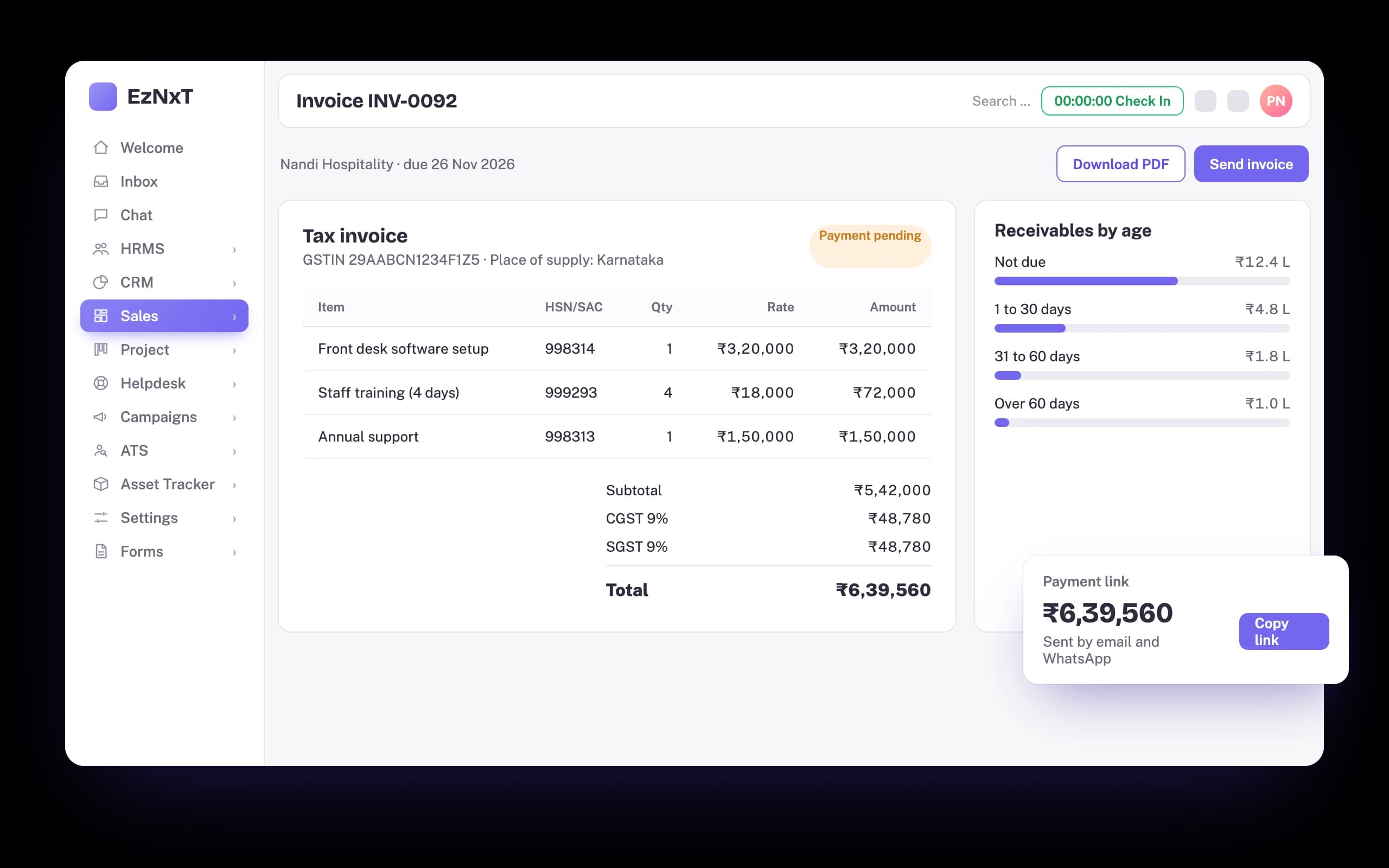
HSN or SAC per line, CGST/SGST or IGST from the place of supply, discounts, round-off and TDS where it applies. Numbering follows your series, with an approval step if you want one.
Paid by link, not by follow-up
Connect Razorpay and every invoice carries a payment link. A payment marks the invoice paid; a partial payment shows the balance. Cheques and NEFT are recorded by hand.
A portal your customers can use
Clients log in to see their quotations, invoices and receipts and to pay. The weekly “please resend the invoice” message stops.
Honest about what it is not
No ledger, no expense book, no bank reconciliation, no GSTR filing. Your CA keeps the books; EzNxT hands them a clean Excel of every invoice and receipt each month.
What can EzNxT billing do for a small business?
From the first quotation to the last reminder, on one customer record.
Quotations, orders and GST invoices
One document moves through three stages. Nothing is retyped, and the numbering, taxes and terms are applied on conversion rather than from memory.
Quotation on the deal
Lines, quantities, discounts and terms, sent as a PDF or a share link the client opens without logging in.
Convert to order and invoice
One click moves a quotation to an order and an order to an invoice, keeping the original for the audit trail.
GST on every line
HSN or SAC codes, tax rates per item, CGST/SGST or IGST from the place of supply, GST-exempt lines, amount in words.
Numbering and approval
Your own series for quotations, orders and invoices, and an optional approval before an invoice goes out.
Discounts, coupons, TDS, round-off
Line and document discounts, coupon codes, TDS deducted by the customer, and the round-off on the total, all on the document.
Payments, links and reminders
Getting paid is the point. The pending list, the link and the receipt are built so that chasing takes minutes.
Razorpay payment links
Connect your Razorpay account; each invoice gets a link to email or send on WhatsApp. Successful payments update the invoice on their own.
Partial payments and write-offs
Record an instalment, see the balance, write off the last ₹40 if that is what it takes to close it.
Pending and overdue list
Every unpaid invoice by customer and age, with the amount received so far. The Monday collections call starts here.
Manual receipts
Cheque, NEFT, UPI and cash receipts recorded against the invoice with a reference and an attachment.
Payment status on the deal
The CRM deal and the project show what has been received, so sales and delivery stop asking accounts.
Clients, currencies and exports
The customer record, the portal they log in to, and the Excel your accountant asks for.
Client records with GST and PAN
Client type, GSTIN, PAN, billing and shipping addresses, contacts, and every document ever raised for them.
Client portal
Customers sign in to see quotations, invoices and receipts, download PDFs and pay by link.
Other currencies
Quote and invoice in USD, AED or EUR with the exchange rate captured on the document; the rupee figure is the one your books use.
Business reports
Sales by customer, by product and by month, downloaded as Excel or PDF.
Role-based access
Who can raise, who can approve, who can see totals. A telecaller does not need to see the invoice list.
EzNxT billing against Zoho Books, Vyapar and TallyPrime
These three are accounting products. The table is here so you can see what EzNxT is, and is not, before you choose.
| EzNxT billing | Zoho Books | Vyapar | TallyPrime | |
|---|---|---|---|---|
| Free plan | 10 users, unlimited invoices | Free if revenue is under ₹25 lakh a year: 1 user + 1 accountant, 1,000 invoices | Trial | None |
| Paid plan starts at | See the pricing page | ₹749 a month per organisation (Standard, annual) | Yearly plans, from a few thousand rupees | ₹22,500 + GST one-time for one user (Silver) |
| GST invoices with HSN, place of supply, TDS | Yes | Yes | Yes | Yes |
| Quotation → order → invoice on a CRM deal | Yes, same record | Needs Zoho CRM | No CRM | No CRM |
| Payment links and client portal | Razorpay links; portal included | Yes | Payment links | No portal |
| Ledger, expenses, bank reconciliation, P&L | No | Yes | Yes | Yes |
| GSTR filing or e-invoice IRN | Export for your CA | Yes | Yes | Yes |
| Runs with HRMS, ATS, projects, helpdesk | Yes, same login | Via Zoho One | No | No |
From each vendor’s public pricing page in November 2026. TallyPrime’s list price is the one its resellers publish; Vyapar shows plans only after sign-in. Check current pages before you decide. Sources: Zoho Books pricing (India), Vyapar pricing.
What billing looks like for four kinds of business
Retainers, daily GST invoices, instalments and an overseas client.
A digital agency in Hyderabad with 14 clients on retainer
Each retainer is a deal in the CRM with a quotation attached. On the 1st, the quotation becomes an invoice with the right GST split, numbered in sequence, and goes out with a Razorpay link. By the 5th, eleven are paid and the three outstanding are on one screen.
An electrical goods distributor in Coimbatore
Forty invoices a day, each with HSN codes and IGST when the buyer is in Kerala. Round-off and TDS are handled on the document. The accountant downloads the month as one Excel and books it in Tally without retyping a line.
A training institute selling batches
Students pay in instalments. Partial payments sit against the invoice, the balance shows on the client portal, and the reminder goes from the pending list. Nobody keeps a separate collection register.
A software consultancy billing a Dubai client
The quotation is in dirhams with the rate captured that day. The invoice shows both figures; the rupee amount is the one the CA sees.
Who the billing module is for, and who needs a ledger instead
Most small businesses need clean invoices and faster payments long before they need double-entry books in the cloud.
A good fit if
- Service businesses that quote first and invoice later: agencies, consultancies, IT firms, clinics, training institutes
- Traders and distributors who raise GST invoices daily and chase payments weekly
- Teams already tracking deals in EzNxT CRM who want the quotation on the deal
- Businesses that want customers to pay by link and see their own invoices
- Companies that bill overseas clients in another currency
Look elsewhere if
- Businesses that need a general ledger, expense tracking, bank feeds or a P&L inside the software
- Companies above the e-invoicing threshold that need IRN generation in the same tool
- Shops that need inventory, stock levels and purchase orders
- Anyone replacing Tally outright; this sits in front of your books, not instead of them
First invoice in under an hour
Five steps, in order. The last one is where the money shows up.
- 1
Enter GST and bank details
Your GSTIN, PAN, bank account for the invoice footer, and the invoice numbering series. Logo and terms go on the template.
- 2
Add products or services with HSN/SAC
Each item carries its code and default tax rate, so a line on an invoice brings its GST with it.
- 3
Raise a quotation on a deal
Pick the client, add lines, apply a discount if there is one. Send the PDF or a share link.
- 4
Convert to order and invoice
When the client agrees, convert. Nothing is retyped; numbering, GST split and place of supply are applied on conversion.
- 5
Collect with a payment link
Connect Razorpay, send the link, and watch the pending list shrink. Record cheque or NEFT payments by hand against the invoice.
A business with twenty products and a logo is ready to send its first invoice in under an hour.
How billing connects to the rest of EzNxT
The invoice is one step in a record that starts in the CRM and ends with your CA.
CRM deal → quotation
The quotation is raised on the deal, so the number the salesperson promised is the number on the invoice.
Order → project
For service work, the order opens a project with a budget and estimated hours, and delivery feedback comes back to the client record.
Invoice → payment link → receipt
A Razorpay link goes out with the invoice; the payment marks it paid and shows on the deal and the project.
Client → portal
Customers log in to see quotations, invoices and receipts, and to pay. “Please resend the invoice” stops arriving on WhatsApp.
Month → CA
Download the month’s invoices and payments as Excel for your accountant’s GSTR-1 and books.
Frequently asked questions
What this module is, what it is not, GST, payments and price.
Is this full accounting software, like Tally or Zoho Books?
No, and it is better to know that now. EzNxT covers the sales side: quotations, orders, GST invoices, payment links and receipts, with a client portal. There is no general ledger, no expense book, no bank reconciliation and no P&L. Your CA still keeps the books; what changes is that every invoice and receipt they need is already clean, numbered and exportable.
Does it generate GST-compliant invoices?
Invoices carry your GSTIN and the customer’s, HSN or SAC codes per line, the CGST/SGST or IGST split from the place of supply, discounts, round-off, TDS where it applies, and the amount in words. Numbering follows the series you set, and an approval step can sit before an invoice is sent.
Can customers pay online?
Connect your Razorpay account once. Each invoice gets a payment link that can be emailed or sent on WhatsApp; a successful payment updates the invoice and the deal, and a partial payment shows the balance. Customers can also see every invoice and receipt in the client portal without emailing you.
Does EzNxT file GSTR-1 or generate e-invoices with an IRN?
Not today. Invoice data exports to Excel in a form your CA can use for GSTR-1, but there is no direct GST portal filing and no IRN generation. If e-invoicing is mandatory for you (turnover above ₹5 crore), keep your e-invoicing tool for that step.
Can I invoice in dollars or dirhams?
Yes. Quotations and invoices can be raised in another currency, with the exchange rate captured on the document so the rupee figure does not drift later.
What does it cost?
Nothing for your first ten users. There is no per-invoice fee and no cap on invoices, and larger teams are on the pricing page. Razorpay charges its own payment gateway fee on online payments, which goes to Razorpay, not to us.
How does it connect to the CRM and projects?
A quotation is raised on a CRM deal. When the deal is won, the quotation becomes an order and the order an invoice, all on the same client record. For service work, the order opens a project, and payments received show on both the project and the client.
Send a GST invoice with a payment link today.
Enter your GSTIN and bank details, add your products with their HSN codes, and raise the first quotation on a deal. The invoice follows with one click.
