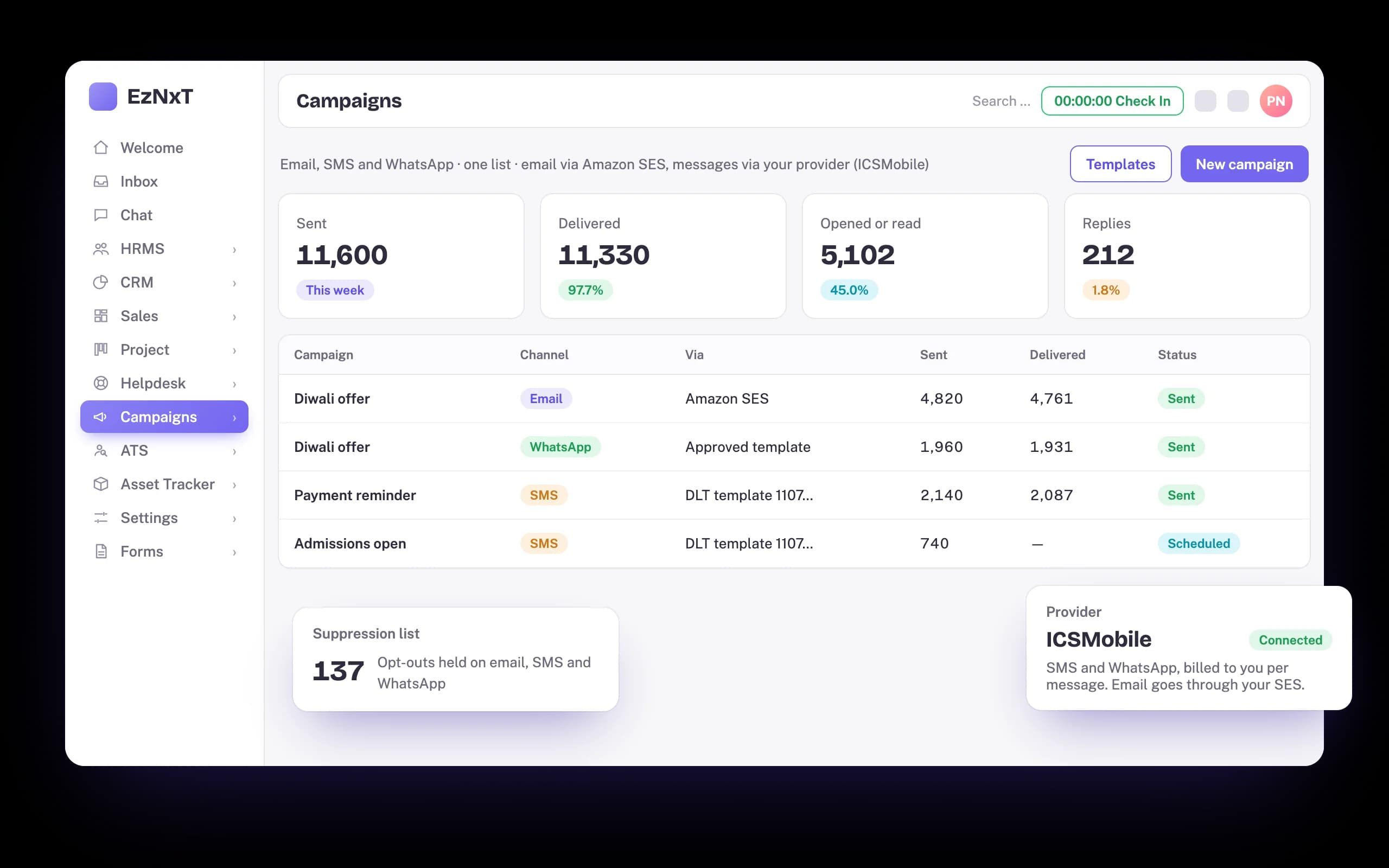
Why do teams send SMS and WhatsApp from EzNxT?
Because the messages, the list and the results sit next to the CRM and the ATS that use them.
Your provider account, your bill
SMS and WhatsApp go through your own provider account, ICSMobile today. The provider charges you per message, and EzNxT adds no charge per message.
DLT values live on the template
The sender ID, the PEID and the DLT template ID are fields on the SMS template, so every campaign sends with the values you registered.
One list for email, SMS and WhatsApp
The mailing list is shared with Bulk Mailer. Each subscriber keeps a name, a mobile number and three extra fields that fill the template.
Opted out means skipped
Numbers on the SMS suppression list are skipped by every SMS campaign, and the skip is recorded with its reason. You can add and remove numbers yourself.
You see what happened to each message
Delivered, failed, clicked for SMS. Delivered, read, link opened and replied for WhatsApp. Failures carry a reason you can act on.
Clear about the limits
ICSMobile is the only provider today, and there are no drip sequences or A/B tests. Email goes through your own Amazon SES account, the same as Bulk Mailer.
First campaign: from provider account to results
Five steps. The first one is slow because DLT and WhatsApp approvals happen with your provider.
- 1
Get your provider account ready
Use your own ICSMobile account for SMS and WhatsApp. Register your sender ID, PEID and SMS templates on DLT, and get your WhatsApp templates approved.
- 2
Add the templates
For SMS, enter the sender ID, the PEID, the DLT template ID and the text with its {#var#} placeholders. For WhatsApp, enter the sender number, the template ID, the header, the footer and the buttons.
- 3
Choose a list
Use a mailing list with mobile numbers. It is the same kind of list Bulk Mailer uses, with a name, a mobile number and three extra fields for each subscriber.
- 4
Test, then send or schedule
Send a test to a few numbers first. Then send now, or pick a time for an SMS campaign.
- 5
Read the results
Check delivered, failed, clicked, read and replied for each message, and add opted out numbers to the suppression list.
The provider side takes the time: DLT registration and WhatsApp template approval happen with your provider and can take days. Plan for that before a deadline.
What can EzNxT Campaigns do for SMS and WhatsApp?
Three jobs: send the right template, skip the people who opted out, and see what happened.
SMS campaigns through your provider
You register the templates with your provider. EzNxT holds the DLT values, fills the placeholders for each subscriber, sends the batches and keeps the record.
DLT templates
Each template holds the sender ID (up to 20 characters), the PEID, the DLT template ID and the text with its {#var#} placeholders.
Personalised messages
The first placeholder takes the subscriber’s name. The next three take the position, company and link kept on the list.
Send now or schedule
Send straight away, or give a time in the future. The campaign is queued and runs in the background.
Test send
Send the campaign to the list you choose as a test. It creates no campaign record and does not change the reports.
Resend to those who did not click
After a send, send again only to the recipients who did not click, and the totals update.
WhatsApp template campaigns
WhatsApp sends approved templates. The template holds the layout, and each recipient gets their own values.
Approved templates
Add the template with its sender number and the template ID from your provider. Use only templates that are already approved.
Header and footer
A header of text, image, video or document, and a short footer, set once on the template.
Buttons for each recipient
Buttons carry values filled for each recipient, such as a link to their own page.
Delivery and read status
Each message moves through sent, delivered and read, or failed with the reason from the provider.
Replies recorded
A reply is stored against the message with its type and text, so you can see what came back.
Control, suppression and reporting
Every message is a row you can read. Opted out numbers are skipped, and failures say why.
Campaign totals
Sent, delivered, failed, pending and clicks for each SMS campaign. Sent, delivered, failed, read, clicked and replied for WhatsApp.
Click tracking
See which recipients opened the link, when, and how many times for SMS.
SMS suppression list
Numbers that the provider reports as blacklisted or that unsubscribed are skipped. You can add and remove numbers.
Failure codes and reasons
A failed SMS keeps the provider’s code and reason, so you can tell a bad number from a template problem.
Credentials per account
The provider key belongs to your account, and every send from your account uses it.
SMS and WhatsApp in EzNxT, side by side
Both channels use the same lists and the same provider account. They differ in the template and in what you see afterwards.
| SMS | ||
|---|---|---|
| What a template holds | Sender ID, PEID, DLT template ID and the text with {#var#} placeholders | Sender number, template ID, optional header, footer and buttons |
| Personalisation | Name, then position, company and link from the list | Placeholders and buttons filled for each recipient |
| Status of each message | Pending, submitted, delivered or failed | Sent, delivered, read or failed |
| What you learn about the recipient | Link clicks, with the time and the count | Whether the link was opened and any reply, with its type and text |
| Failures | Failure code and reason on the message | Failure reason from the provider on the message |
Taken from how the two channels are set up in EzNxT. Your provider decides prices, approval times and message limits.
Four teams, two channels
A consultancy, an institute, a distributor and a retail brand.
A recruitment consultancy with a new opening
The recruiter picks the candidates from the ATS and sees a live preview for the SMS and for the WhatsApp message before sending. By the afternoon the report shows which messages were delivered, which links were opened and which candidates replied, and the recruiter calls the ones who did.
A coaching institute before admissions
An admission reminder goes by SMS to a list of parents using one DLT template. The first variable is the parent’s name and the fourth is the link to the form. Parents who opted out are skipped, and a few days later a resend goes only to the parents who did not click.
A distributor announcing an offer to dealers
A WhatsApp template with an image header goes to the dealer list. The button carries each dealer’s own link. Read receipts and replies show which dealers are interested, and the sales team starts with them.
A retail brand before a festival offer
The team sends a test to the numbers of three staff members first. It does not touch the campaign reports. Then the real SMS is scheduled for the morning and the totals for sent, delivered, failed and clicks are there the same day.
Who the Campaigns module is for, and who should look elsewhere
For businesses in India that already message their people by SMS and WhatsApp and want one record of what was delivered.
A good fit if
- Companies with DLT registered sender ID, PEID and SMS templates, or ready to register them
- Recruiters and consultancies that send jobs to candidates by SMS and WhatsApp from the ATS
- Teams that keep customer or candidate mobile numbers in a mailing list and want delivery, click and reply results per message
- Businesses that want the message bill to come directly from their own ICSMobile account
Look elsewhere if
- Businesses that have not completed DLT registration, because commercial SMS cannot go out in India without it
- Teams that need a provider other than ICSMobile today
- Marketers who need drip sequences, A/B tests or automation triggered by behaviour
- Anyone who only wants email and no SMS or WhatsApp, for whom Bulk Mailer is the simpler module
How campaigns connect to the lists, the ATS and suppression
The list is shared, the ATS sends through the same channels, and opted out numbers stay out.
Mailing list → SMS
The list you built for Bulk Mailer also sends SMS and WhatsApp, because each subscriber keeps a mobile number next to the email address.
ATS job → candidate delivery
The ATS sends a job to candidates by SMS and WhatsApp from one screen, with a live preview of each channel.
Suppression → every SMS campaign
A number on the SMS suppression list is skipped by every SMS campaign of your account, with the reason recorded.
Reply → message record
A WhatsApp reply is stored against the message that prompted it, with its type and text, so the sender can read what came back.
Frequently asked questions
Providers, DLT, WhatsApp templates, reports, and what is not included.
What does the Campaigns module do?
It runs email, SMS and WhatsApp campaigns to the same lists and records what happened to every message. Email goes through your own Amazon SES account. SMS and WhatsApp template messages go through your own provider account. Bulk Mailer is the email only module and uses the same mailing lists.
Which SMS and WhatsApp provider does it use?
Your own account with ICSMobile, which is the provider supported today. The key for your account is kept against your account and every send from it uses that key, so the provider bills you for the messages. Other providers are not supported yet.
What do I need before I can send an SMS in India?
DLT registration with your provider. Your sender ID, your PEID and each message template must be registered, and you enter the sender ID, the PEID and the DLT template ID on the template in EzNxT. The template text uses {#var#} placeholders. EzNxT fills the first with the subscriber’s name and the next three with the three extra fields on the list: position, company and link.
How do WhatsApp campaigns work?
WhatsApp sends approved templates. You add the template with its sender number, the template ID from your provider, an optional header (text, image, video or document), a footer and buttons. Each recipient receives their own values for the placeholders and buttons. A template has to be approved by WhatsApp through your provider before you can use it.
What do the reports show for each message?
For SMS, every message shows pending, submitted, delivered or failed, with the time, the failure code and reason when it failed, and link clicks. The campaign shows totals for sent, delivered, failed, pending and clicks. For WhatsApp, every message shows sent, delivered, read or failed, whether the link was opened, and any reply with its type and text.
Can I schedule a campaign or test it first?
SMS campaigns can be sent now or scheduled for a time in the future. A test send goes to the list you choose without creating a campaign record, so it does not change your reports. After a send you can send again only to the recipients who did not click.
What happens to numbers that opted out?
Numbers on the SMS suppression list are skipped by every SMS campaign of your account, and the skip is recorded on the message with its reason. A number is added when the provider reports it as blacklisted or when the recipient unsubscribes. You can also add and remove numbers yourself.
Who pays for the messages?
Your provider bills you per message at its own rates. EzNxT does not add a charge per message, and the plan is described on the pricing page.
What is not included?
If you only need email, Bulk Mailer is the email only module. There are no drip sequences, no A/B tests and no providers other than ICSMobile for now. If you need another provider, tell us which one.
Send the next reminder to the people who need it.
Register your template with your provider, add it to EzNxT, pick a list and send a test first. The results come back for each message.
