Three teams that stopped losing enquiries
A software company, a consultancy and a clinic chain.
A software company with 300 customers
The website contact form has topics: Billing, Technical, Sales. Billing goes to the accounts group with a 2-day deadline; Technical to the support group with 1 day. A ticket from a paying customer opens with their invoices and last deal visible, so nobody asks “which plan are you on?”
A recruitment consultancy
Candidates write in asking about their application. The ticket is matched to the candidate record and the job they applied for; the recruiter answers from the application, and the comment is on both.
A clinic chain
Appointment questions and complaints arrive through the site. Each branch is a group; the branch manager owns tickets for their location and sees them in one list sorted by due date, with a dashboard count of what is open.
What can EzNxT Helpdesk do for a small team?
Capture the enquiry, know who sent it, answer it on time.
Tickets from your website form
The contact form on your EzNxT pages, and the one you point your own site to, creates tickets with a topic, an owner and a deadline.
Topics with routing
Each topic has a default owner or group. Billing goes to accounts; Careers goes to HR.
Deadline in days per topic
A due date is set the moment the ticket is created. Two days for billing, one for technical, five for general.
Tickets raised by your team
A phone call or a walk-in becomes a ticket from the dashboard, on behalf of the customer.
Email notifications
The customer is told when the ticket is received, when the status changes and when a comment is added.
Customer context on every ticket
The thing a standalone helpdesk cannot do: show the business relationship next to the question.
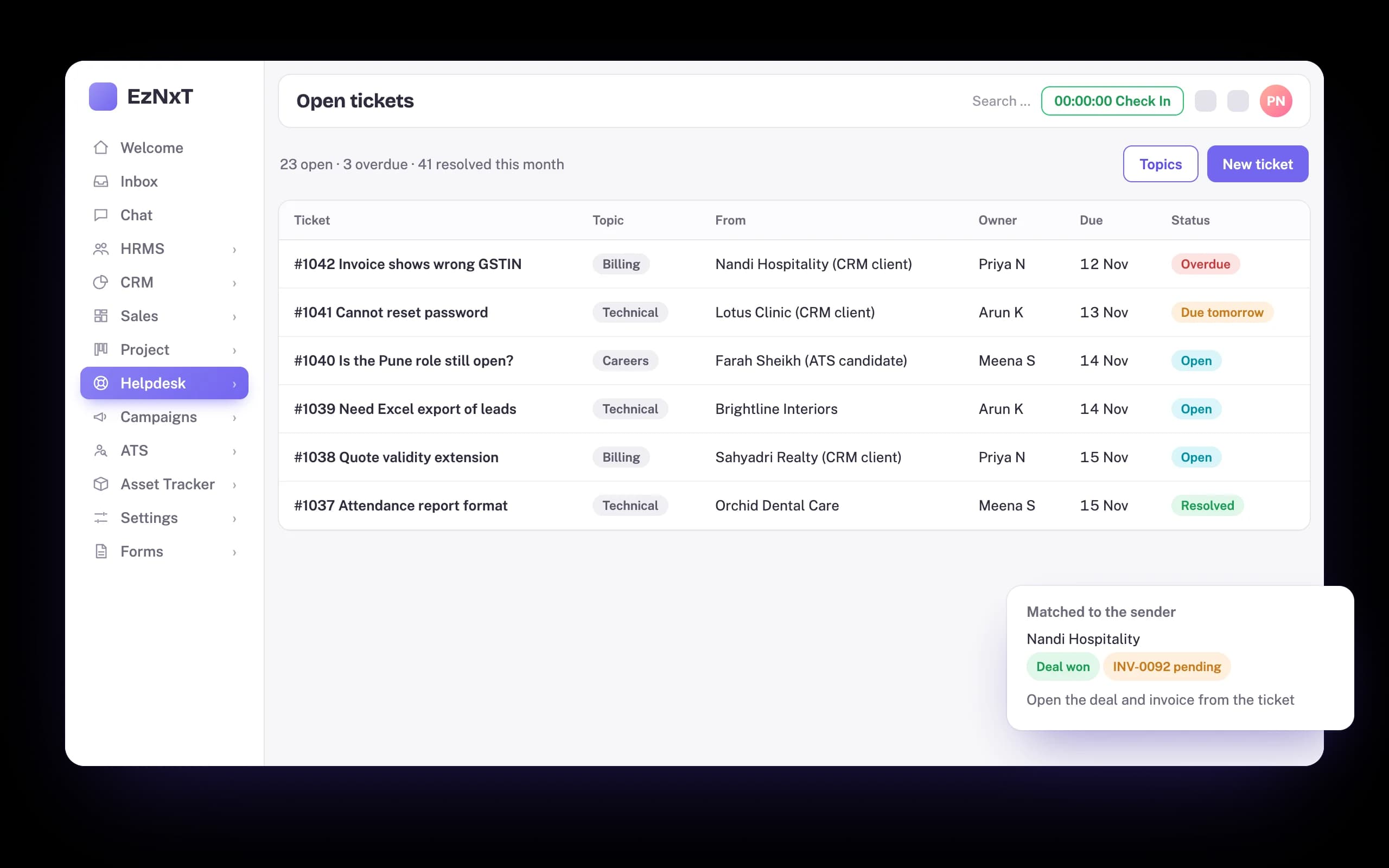
Matched to CRM clients and contacts
By email and phone. The ticket appears on the client record; the client’s deals and invoices appear on the ticket.
Matched to ATS candidates
A candidate’s question is linked to their application and the job, so the recruiter answers from the ATS.
Open ticket list
Everyone on the team sees the same queue, filtered by topic, owner, status or due date.
Status and comments
Open, In Progress, Resolved, with a comment thread the customer receives by email.
Role-based access
Agents see their group’s tickets; managers see all; sales sees tickets for their clients.
Dashboard, reports and the rest of the team
What is open, what is late, and who to pull in.
Dashboard counts
Open, overdue and resolved by topic and owner, for the Monday look.
Excel download
The ticket list with dates, owners and statuses for a monthly review or a customer report.
Team chat and internal mail
Discuss the difficult ticket with a colleague in the same app, then reply on the record.
Android and iOS apps
See the queue, pick up a ticket and comment from a phone.
Twenty minutes to a working ticket queue
Topics first, then the form, then the list.
- 1
Set the topics
Billing, Support, Sales enquiry, Careers, whatever your customers write about. Each topic gets a default owner or group and a deadline in days.
- 2
Put the form on your site
The contact form is live on your EzNxT pages, including the careers page. Point your own website’s contact link at it.
- 3
Work the open list
Agents open the list, filter by topic or owner, and pick up tickets. Status moves from Open to In Progress to Resolved; comments go to the customer by email.
- 4
Use the customer context
The ticket shows the matched client, contact or candidate. Answer with their invoices, deals or application in front of you.
- 5
Check the dashboard
Open, overdue and resolved counts by topic and owner. Download the list as Excel for the monthly review.
Setup is about twenty minutes. The first ticket usually arrives before you have finished reading this.
Why do small businesses track tickets in EzNxT?
Because the enquiry that sat unanswered in a founder’s inbox for nine days was from your biggest customer.
Unlimited tickets
Support desks charge per agent.
The ticket knows who is asking
The sender is matched to your CRM client, contact or ATS candidate. The person answering sees the invoices, deals or application behind the question before typing a word.
An owner and a due date on every ticket
Each topic routes to a default owner or group and sets a deadline in days. The open list sorts by what is due, and the dashboard counts what is overdue.
One queue the whole team sees
Open, In Progress, Resolved. Filter by topic, owner or status. Comments go to the customer by email and stay on the record.
Topics that match your business
Billing, Technical, Sales enquiry, Careers, Complaints: you name them, and each one carries its own routing and deadline.
Honest about what it is not
No SLA clocks, no email-to-ticket from a mailbox, no canned replies or chat widget. Contractual support desks should use Freshdesk or Zoho Desk; website enquiries that must not be lost belong here.
EzNxT Helpdesk against Freshdesk, Zoho Desk and Zendesk
Those three are support desks. This is a ticket list attached to your CRM. The table is here so you pick the right one.
| EzNxT Helpdesk | Freshdesk | Zoho Desk | Zendesk | |
|---|---|---|---|---|
| Free plan | 10 users, unlimited tickets | None; 14-day trial | 3 agents | None; 14-day trial |
| Paid plan starts at | See the pricing page | $19 per agent a month, annual (Growth) | $7 per agent a month, annual (Express) | $19 per agent a month, annual (Support Team) |
| Tickets from web form with topics, owners and deadlines | Yes | Yes | Yes | Yes |
| Email-to-ticket from a shared mailbox | No | Yes | Yes | Yes |
| SLA timers and automatic escalation | Deadline per topic only | Yes | Yes, from Standard | Yes |
| Canned replies, knowledge base, chat widget | No | Yes | Yes | Yes |
| Ticket matched to CRM deals, invoices and job applications | Yes, same login | Via Freshsales or integration | Via Zoho CRM | Integration |
From each vendor’s public pricing page in November 2026. Check current pages before you decide. Sources: Freshdesk pricing, Zendesk pricing.
Who the helpdesk is for, and who needs a dedicated support desk
For companies whose customer questions arrive through a website form and get lost in someone’s inbox.
A good fit if
- Small businesses that get 5 to 100 enquiries a week through their website
- Teams that want the question next to the customer’s deals and invoices, not in a separate tool
- Recruiters whose candidates write in and should be matched to their application
- Companies already on EzNxT CRM who want enquiries tracked with an owner and a due date
- Founders who want to see what is open and what is overdue without asking
Look elsewhere if
- Support teams working to contractual SLAs with response-time clocks and escalation
- Companies that need email-to-ticket from a shared mailbox
- Teams that need canned replies, macros, a knowledge base or a chat widget
- Call centres with phone integration and agent routing
How tickets connect to the customer record
A ticket is a note on a relationship you already track.
Ticket → client record
The sender is matched to a CRM client or contact; the ticket appears on their record next to deals and invoices.
Ticket → candidate
A candidate’s question is matched to their application, and the recruiter answers from the ATS.
Topic → owner group
Billing tickets land with the accounts group, support tickets with support, each with its own deadline.
Ticket → team chat
Discuss the awkward ones in team chat or internal mail without leaving the app, then reply on the ticket.
Frequently asked questions
Where tickets come from, SLAs, customer context, and what is missing.
Where do tickets come from?
From the contact form on your website or careers page, and from your team raising them in the dashboard on a customer’s behalf. Each topic on the form (Billing, Support, Sales enquiry) can route to a default owner or group. Email-to-ticket, where a mailbox is polled and every email becomes a ticket, is not available yet.
Does it have SLAs and escalation?
Not as timers. Each topic has a default deadline in days, so every ticket gets a due date when it is created, and the open list sorts by it. There is no automatic escalation to a supervisor when a deadline passes and no response-time clock. If you run a support desk against contractual SLAs, Freshdesk or Zoho Desk are built for that.
How does it know who the customer is?
When a ticket arrives, the sender’s email and phone are matched to your CRM clients and contacts, and to ATS candidates. The ticket shows on that record, and the record shows on the ticket, so the person answering sees the deals, invoices or applications behind the question.
Can customers see their tickets?
Customers get email updates when the status changes or a comment is added. The client portal shows quotations and invoices; a ticket history view for customers is not there yet.
Is there a shared inbox, canned replies or chat widget?
The open ticket list is the shared queue: every agent sees it, filters it and picks up what is theirs. There are no canned reply snippets and no website chat widget. Internal mail and team chat exist in the same app for the conversation behind a ticket.
What does it cost?
It is part of the same plan: free for ten users, unlimited tickets. Larger teams are on the pricing page.
Stop losing enquiries in a shared inbox.
Set three topics with owners and deadlines, point your contact page at the form, and tonight’s enquiry has a due date by morning.
