Why do small businesses send campaigns from EzNxT?
Because paying per contact for a list you already own never made sense.
No per-contact pricing, ever
Mailchimp prices your list. Here the list is yours and free; you connect your own Amazon SES account and pay Amazon about ₹8 per 1,000 emails. A 20,000-contact newsletter costs about ₹170.
One list shared with the CRM
Build lists from Excel or from CRM contacts and tags. An unsubscribe updates the contact, not just the list, so a person who opts out is not mailed from another campaign.
Sent from your domain, signed by Amazon
Verify your domain in SES once and every campaign carries your name with DKIM signed. No shared IP pool full of strangers’ reputations.
Suppression that actually suppresses
Bounces, complaints and unsubscribes go to one list that every future campaign checks, across every campaign. A dead address is never sent to twice.
Reports you can act on
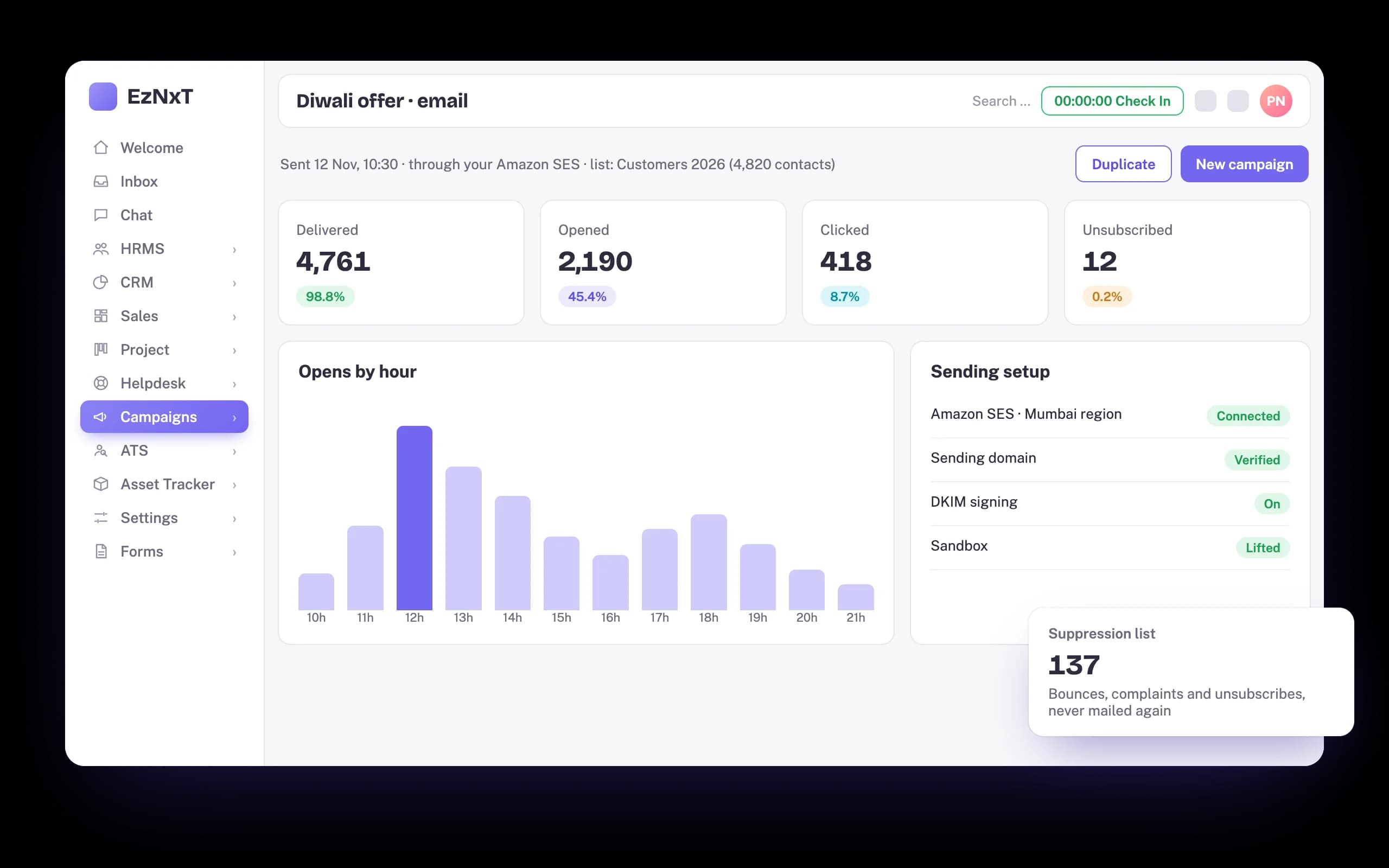
Delivered, opened, clicked, bounced, complained and unsubscribed, per campaign and per recipient, downloadable as Excel. Hourly for job deliveries.
Honest about what it is not
No A/B tests, no drip automation, no landing page builder. If those are the job, Brevo does them well. If the job is sending to your list without a monthly bill tied to its size, start here.
First campaign: from AWS account to report
Five steps. The AWS one is slow because Amazon is careful, which is also why your mail gets delivered.
- 1
Connect Amazon SES
Create an AWS account, open SES in the Mumbai region, verify your domain and a sender address. Paste the access key into Campaign Settings and watch the status turn green.
- 2
Build a list
Import subscribers from Excel or pull them from CRM contacts and tags. Validation flags malformed addresses before the first send.
- 3
Create a template
Design the email once with your logo and merge fields for name and company. Preview on desktop and phone.
- 4
Schedule the campaign
Pick the list, the template and the sender, set a time or send now. The campaign limit protects you from sending twice by mistake.
- 5
Read the report
Delivered, opened, clicked, bounced, complained, unsubscribed. Download it as Excel; bounces are already in suppression.
The SES step is the slow one: Amazon takes up to 24 hours to lift the sandbox on a new account. Everything after that is minutes.
What can EzNxT Campaigns do for a small marketing team?
Lists, templates, sends and reports, on four channels, from one screen.
Email campaigns through your Amazon SES
You bring the AWS account; EzNxT brings the templates, lists, scheduling and reporting. Amazon bills the sending, and it is cheap.
SES connection and status
Paste your access key, pick the region (Mumbai for India), verify senders. The settings screen shows whether SES has lifted the sandbox.
Templates with merge fields
Design once with your logo; drop in the recipient’s name and company. Preview on desktop and phone before sending.
Scheduled sends
Send now or at Tuesday 10 am. A per-account campaign limit stops a duplicate send.
Mailing lists and subscribers
Import from Excel or build from CRM contacts and tags. Keep separate lists for dealers, customers and prospects.
List validation
Malformed and role addresses are flagged before the first send, which keeps your bounce rate, and your SES reputation, healthy.
Deliverability and suppression
The checks that protect your sender reputation when mail goes out from your own domain.
Your domain, signed by Amazon
You verify your domain in Amazon SES once. Amazon signs the mail with DKIM, so it carries your name, not a shared pool’s.
Validation before every send
Each list is checked for bad addresses before the first send, so a typo does not become a bounce.
One suppression list
Bounces, complaints and unsubscribes go to a list that every campaign checks. A dead address is never sent to twice.
Reports you can download
Delivery, open, click and bounce numbers per campaign, downloadable as Excel for the monthly review.
Lists tied to the CRM
Lists come from Excel or from CRM contacts and tags, and an unsubscribe applies to the contact.
Reports, suppression and CRM
What happened, who to stop sending to, and who to call next.
Campaign reports
Delivered, opened, clicked, bounced, complained, unsubscribed. Per campaign, per recipient, as Excel.
Suppression list
Automatic for bounces and complaints, manual for anyone who asks on the phone. Checked on every send.
CRM in both directions
Lists from CRM tags; replies and sign-ups added to CRM with the campaign as source.
Unsubscribe handling
Every email carries an unsubscribe link; the click updates the contact everywhere, not only the list.
EzNxT Campaigns against Mailchimp, Brevo and Zoho Campaigns
The others price the list. EzNxT prices nothing per contact, and Amazon charges you for the sending.
| EzNxT Campaigns | Mailchimp | Brevo | Zoho Campaigns | |
|---|---|---|---|---|
| Free plan | 10 users, unlimited contacts; you pay AWS about ₹8 per 1,000 emails | 250 contacts, 500 emails a month | 300 emails a day, Brevo branding | 2,000 contacts, 6,000 emails a month |
| Cost for 20,000 contacts, one send a month | About ₹170 in AWS fees | Several thousand rupees a month on Standard | From about $9 a month for 5,000 emails; more for 20,000 | Plan priced by contact count |
| A/B testing and drip automation | No | Yes, on paid plans | Yes | Yes |
| Lists from your CRM contacts | Same login, same contacts | Integration | Brevo CRM | Zoho CRM |
| Sends from your own domain | Yes, via your SES | Yes | Yes | Yes |
From each vendor’s public pricing page in November 2026, and Amazon SES’s published rate of $0.10 per 1,000 emails. Promotional prices and plan limits change; check current pages before you decide. Sources: Mailchimp pricing, Brevo pricing, Amazon SES pricing.
Four lists, four channels
A distributor, a recruiter, a coaching institute and a SaaS company.
A B2B distributor with 18,000 dealer contacts
A monthly price list goes out as an email campaign to a list built from CRM clients tagged Dealer. Amazon bills about ₹150 for the send. Opens and clicks show which regions read it; 40 bounces drop into suppression and are never sent again.
A recruitment consultancy
A new mandate goes to 600 matching candidates by email in the morning. The hourly report shows 212 opens, 61 clicks and 19 applications by evening, and the recruiter calls the 19.
A coaching institute before admissions season
The admissions brochure goes by email to 9,000 parents from the institute’s own domain. Unsubscribes are suppressed before the follow-up email, and responses can add people to the CRM.
A SaaS startup sending a product update
Template designed once, scheduled for Tuesday 10 am, sent to 4,200 users from their own domain through SES. Unsubscribes update the CRM contact.
Who the Campaigns module is for, and who needs a marketing suite
For businesses that send to their own list a few times a month and want to stop paying per contact.
A good fit if
- Companies with a customer or candidate list of 1,000 to 200,000 who send newsletters, price lists and offers
- Recruiters and consultancies who deliver jobs to a talent pool by email
- Teams already using EzNxT CRM who want the list built from contacts and tags
- Businesses comfortable creating an AWS account and verifying a domain (about an hour, once)
- Anyone who has looked at a Mailchimp invoice for 20,000 contacts
Look elsewhere if
- Marketers who need drip sequences, A/B tests and behaviour-triggered automation
- Teams that want a drag-and-drop landing page builder in the same tool
- Businesses that cannot or will not open an AWS account
- Cold outreach to purchased lists; SES will suspend you, and so will we
How campaigns connect to CRM and ATS
The list is the CRM, and the responses go back into it.
CRM tags → list
Build a list from contacts tagged Dealer, or from clients won in the last year, without exporting a file.
ATS job → candidate delivery
The ATS uses the same templates and suppression list to deliver a job to a talent pool by email.
Reply → lead
A response to a campaign can create or update a CRM lead, with the campaign as its source.
Unsubscribe → contact
An unsubscribe marks the CRM contact, so sales sees it too, and no list emails them again.
Frequently asked questions
Sending costs, AWS setup, deliverability, and what is missing.
How can bulk email be free? Who pays for sending?
You connect your own Amazon SES account, and Amazon bills you directly: about $0.10 per 1,000 emails at its public rate, which is roughly ₹8. EzNxT charges nothing per email and nothing per contact. A 20,000-contact newsletter costs you about ₹170 in AWS fees, where Mailchimp would price the list itself in the thousands of rupees a month.
Do I need an AWS account to start?
Yes, for email. Create a free AWS account, open Amazon SES in the Mumbai region, verify your sending domain, and paste the access key into Campaign Settings. The screen shows your SES status, so you know when Amazon has moved you out of the sandbox. SMS, WhatsApp and voice campaigns do not need AWS.
Does Bulk Mailer send SMS or WhatsApp?
No. Bulk Mailer is email only. SMS and WhatsApp are in Campaigns, which also sends email and uses your own provider account for the messages; ICSMobile is supported today. The two modules share lists and the suppression list.
How is deliverability handled?
Three ways. Your domain is verified in SES, so DKIM signing is Amazon’s job. Every list is validated for bad addresses before a send. Bounces, complaints and unsubscribes go to a suppression list that every future campaign checks, so a dead address is never emailed twice.
Is there A/B testing or drip automation?
No. Campaigns are one send to one list, scheduled or immediate. There is no subject-line split test and no multi-step automation. If a welcome series that fires on sign-up is the core need, Brevo or Zoho Campaigns do that; if you send a newsletter, a price list and an offer a month to the same list, this covers it at a fraction of the cost.
Can I email my CRM contacts without exporting them?
Yes. Lists can be built from CRM contacts and tags, and responses can add people to the CRM. Unsubscribes apply to the contact, not just the list.
What does it cost after 10 users?
The first ten users are free; larger teams are on the pricing page. Sending costs are separate and go to the provider: AWS for email.
Send the next newsletter for the price of a coffee.
Connect Amazon SES this afternoon, import the list, design one template. Tuesday’s campaign goes out from your own domain.
