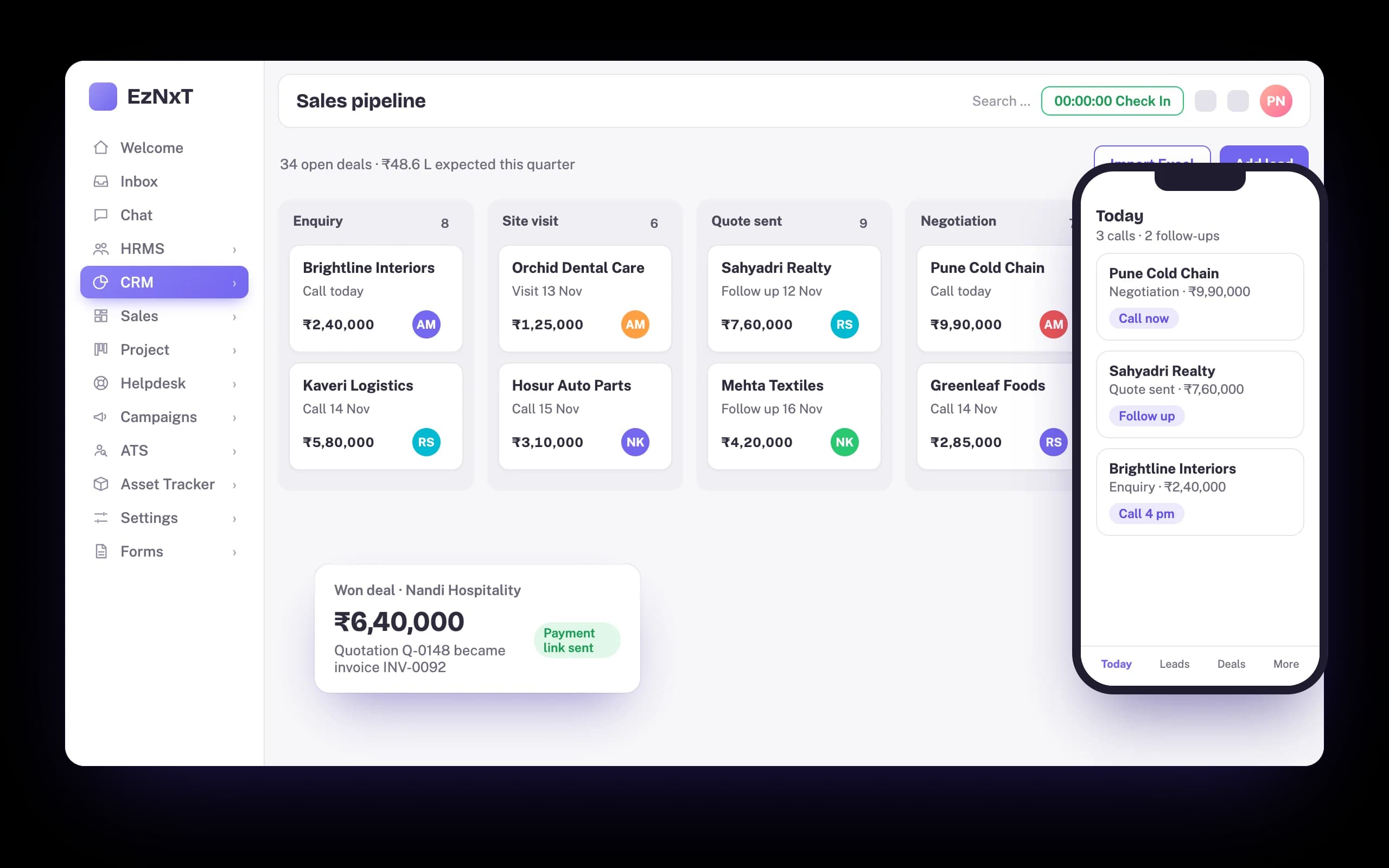
Who EzNxT CRM is for, and who should pass
A CRM only works if people open it. This one is built for teams small enough that everyone knows everyone.
A good fit if
- Sales teams of 2 to 50 who track leads in Excel or on WhatsApp today
- Businesses that quote, invoice and chase payments from the same customers and want it in one place
- Owners who want to see the pipeline without asking anyone for a report
- Real estate, consulting, agencies, clinics, traders and distributors in India
- Teams already running EzNxT HRMS, Projects or Campaigns
Look elsewhere if
- Enterprise sales with territory rules, approval chains and custom objects
- Teams that need a built-in dialer or marketing automation inside the CRM
- Companies that need lead sync by API from job or property portals
- A one-person business happy with a notebook and a phone; a CRM adds steps you may not need yet
Why do small businesses pick EzNxT CRM?
Not a stripped-down free tier. The same CRM, priced for teams of ten rather than a thousand.
No trial clock
Not a trial. Ten people can use the whole CRM for as long as they like.
One pipeline the whole team sees
Leads sit in stages you name yourself. A rep opens the board and knows what to call on today; the owner opens it and sees what is stuck. No Monday status email.
Quotation to invoice without retyping
Raise a quotation on the deal, turn it into an order, then an invoice, then record the payment. The same record moves through Sales, and Accounting picks it up for GST.
Your data stays yours
Download leads, deals and reports as Excel whenever you want. Records are encrypted, and roles control who sees what; a new telecaller does not need to see every deal’s value.
Built around how Indian SMBs sell
Lead source tracking, bulk CSV import from portal exports such as 99acres and MagicBricks, and rupees everywhere. Nothing is priced in dollars or hidden behind a US-first plan.
Live by this afternoon
Import a spreadsheet, name your stages, add your team. Most small businesses are tracking real leads within a working day, and nobody needs a consultant.
What can EzNxT CRM do for a small sales team?
Three jobs, done without a spreadsheet: keep every lead, see every deal, and follow up on time.
Leads and contacts in one record
Every lead carries its source, owner, notes and the calls and emails logged against it. Hand a lead to a colleague and the history goes with it, so the customer never repeats themselves.
Contact and Client Records
One record per person and company: phone, email, GSTIN, client type, past deals, and every conversation so far.
Lead Pipeline View
A board of your leads by stage. Drag a card to move a deal; the owner and next action travel with it.
Excel Import and Merge
Upload leads or contacts from Excel or a portal export. Every row is validated first, and duplicate contacts can be merged afterwards.
Sales Reports
Leads by source, conversions by rep, revenue by month. Download as Excel to share with a partner or an investor.
Deal Value Tracking
Put a rupee value and an expected close date on each deal and watch the pipeline total change as deals move.
Pipeline, deals and quotations
See where every deal is, what it is worth, and when it should close. Raise the quotation from the same screen, so the number the customer saw is the number that gets invoiced.
Pipeline Stages
Name your own stages: Enquiry, Site Visit, Quote Sent, Negotiation, Won, Lost. Separate pipelines for separate products if you need them.
Sales Rep Performance
Calls made, deals moved, deals won, per rep per month. Useful for coaching, and for deciding who gets the next hot lead.
Win/Loss Analysis
Record why a deal was lost (price, timing, competitor) and look at the pattern after a quarter.
Quotations and Orders
Create a quotation on the deal, convert it to an order and then an invoice. Accounting picks it up for GST.
Forecast Revenue
Pipeline value weighted by stage and close date. A rough number, but a number, which beats a guess in the Monday meeting.
Follow-ups, reminders and activity
Most deals are not lost to a competitor; they are lost to silence. Each lead gets a next action and a date, and the CRM keeps it in front of the owner until it is done.
Lead Reminders
Set “call back Thursday 11am” on the lead. The task appears on the rep’s Today list and stays there until it is marked done.
Activity Timeline
Calls, emails, meetings, stage changes and notes in one chronological feed per lead.
Lead Source and Ad Tracking
Web leads keep their source, medium and click ID, so you know which campaign produced the customers, not just the enquiries.
Task Assignment
Give a follow-up to a colleague from inside the lead. They see it on their list; you see whether it was done.
Daily Activity Log
Every logged call, email, visit and note per rep, per day, so a weekly review takes ten minutes instead of an hour.
What a week with EzNxT CRM looks like
Four kinds of business, four different pipelines, the same CRM.
A property consultancy in Kochi with six telecallers
Leads arrive from 99acres, MagicBricks and walk-ins. Each export is imported as a file with the source tagged, and duplicates are merged before anyone calls. Telecallers work a Today list of callbacks; a site visit moves the card to the next stage. The owner looks at one board on Friday instead of six Excel sheets.
A two-partner HR consultancy
Thirty open proposals, each worth between ₹40,000 and ₹6 lakh. Every deal has a value, a probability and an expected close date, so the partners see a weighted pipeline figure rather than a gut feel. When a proposal is accepted, the quotation becomes the invoice with GST already on it.
An industrial supplies distributor
Repeat customers order every few weeks. The contact record shows the last order, the last price quoted and the open support ticket, so the rep is not caught out on the call. Payment links go out from the invoice and the receipt updates the deal.
A clinic chain running Google Ads
Leads from the website form carry the source, medium and click ID with them, so the marketing manager can tell which campaign produced the patients who actually booked, not just the ones who filled a form.
How to set up EzNxT CRM in an afternoon
Five steps. The longest one is cleaning your own spreadsheet.
- 1
Create the account
Sign up with an email address. No card, and the ten free users are there from the first minute.
- 2
Import leads and contacts
Export your Excel or old CRM, upload it, and match the columns to Name, Phone, Source, Owner and Stage. The validator lists every problem row before anything is saved.
- 3
Name your stages
Use the words your team already uses: Enquiry, Site Visit, Quote Sent, Negotiation, Won, Lost. Six stages is plenty, and you can run a second pipeline for a second product line.
- 4
Give every lead one owner
Shared leads are nobody’s leads. Assign each one, so the Today list and the reminders land with the right person.
- 5
Set the first reminders
Add a next action and a date to the leads that matter this week. From then on the CRM reminds, and the weekly review becomes a look at the board.
A 2,000-row import and a six-person team takes about two hours, most of it cleaning the spreadsheet.
EzNxT CRM against Zoho CRM, HubSpot and Bitrix24 on price and free limits
The free plans are where small teams start, so that is what the table compares.
| EzNxT CRM | Zoho CRM | HubSpot CRM | Bitrix24 | |
|---|---|---|---|---|
| Free plan | 10 users, every feature | 3 users, limited features | 2 users, 1,000 contacts | 2 users, 5 GB storage |
| Paid plan starts at | See the pricing page | About ₹800 per user a month (Standard, annual) | $7–20 per seat a month (Starter, depending on term) | $49 a month for 5 users (Basic, annual) |
| Quotation to GST invoice in the same system | Yes, with HSN codes, place of supply and TDS | Needs Zoho Books, a separate subscription | Needs an add-on or an integration | Yes |
| HRMS, projects, helpdesk and campaigns under the same login | Yes, all included in the free 10 users | Via Zoho One, $37–105 per user a month | Separate hubs, priced separately | Tasks and projects yes; no accounting or HRMS payroll |
| Mobile apps | Android and iOS | Android and iOS | Android and iOS | Android and iOS |
| Priced in | Rupees | Rupees | US dollars | US dollars |
Prices and limits as published on each vendor’s pricing page in November 2026; they change often and some are only shown after sign-in, so check before you decide. Sources: Zoho CRM pricing, HubSpot pricing, Bitrix24 pricing.
What the CRM hands to the rest of EzNxT
The point of one login is that a record keeps moving after the sale.
Won deal → GST invoice
Convert the quotation on a won deal into an order and an invoice. The invoice carries the GSTIN, HSN codes and the CGST/SGST or IGST split; you do not type the customer twice.
Invoice → payment link
Send a Razorpay payment link from the invoice. When the customer pays, the invoice shows paid and the deal shows the amount received.
Contact list → campaign
The Campaigns module reads CRM contacts and tags. Send the price-list update to “Won, last 12 months” by email, SMS or WhatsApp without exporting a list.
Customer → support history
A ticket raised through your contact form is matched to the client record. The rep sees the open complaint before quoting the renewal.
Closed deal → project
For service businesses, a won order becomes a project with tasks, time logs and a budget, and the delivery rating comes back to the client record.
Customer → client portal
Customers log in to see their quotations, invoices and payments, so “can you resend the invoice?” stops arriving on WhatsApp.
Frequently asked questions
Questions about pricing, features, imports, and how EzNxT CRM compares to other tools.
Is EzNxT CRM free?
Yes, for up to 10 users, with every feature: pipelines, reports, quotations and the mobile apps, and no time limit. Larger teams are on the pricing page. There is no separate charge for pipelines, reports, quotations or the mobile apps.
Can I move my data in from Zoho, HubSpot or a spreadsheet?
Export contacts and leads to Excel from the old tool and upload the file. The importer checks every row first and shows you the errors in one list, so a bad phone number in row 412 does not stop the other 2,000. Notes and activity history from another CRM usually need a second file; ask during onboarding and we help with the mapping.
What does EzNxT CRM not do?
It does not pull leads from 99acres, MagicBricks or Justdial by API; you import their exports. It has no built-in dialer, and it is not a marketing automation suite with drip sequences. Campaigns by email, SMS, WhatsApp and voice live in the Campaigns module, which reads the same contact list.
Who owns the customer data, and can I take it out?
You do. Download leads, contacts, deals and reports as Excel whenever you want, with no request to support and no notice period. Records are encrypted in storage and in transit, and roles decide which users can see deal values or export at all.
Does it work for a real estate or consulting business?
Real estate is the most common use: lead source, a site-visit stage, follow-up reminders and portal CSV imports are all there, and there is a separate guide for real estate teams. Consultancies, clinics, agencies, traders and distributors use the same pipeline with their own stage names.
How is this different from Zoho CRM or HubSpot?
Two things. Free for up to 10 users. Scope: the deal you win here becomes a GST invoice, a project and a support history under the same login, with nothing to integrate and no second subscription.
Can I use it on my phone?
There are native Android and iOS apps, and the web version works in a phone browser. Reps log a site visit or a call from the car park; the owner checks the pipeline from anywhere.
Put your leads in one place this week.
Import the spreadsheet, name your stages and give each lead an owner. If it has not stuck after a month, export everything to CSV and walk away; there is nothing to cancel.
