Why teams use EzNxT Forms
The form is the easy part. The value is that each submission lands where the work happens.
Four destinations, no copying
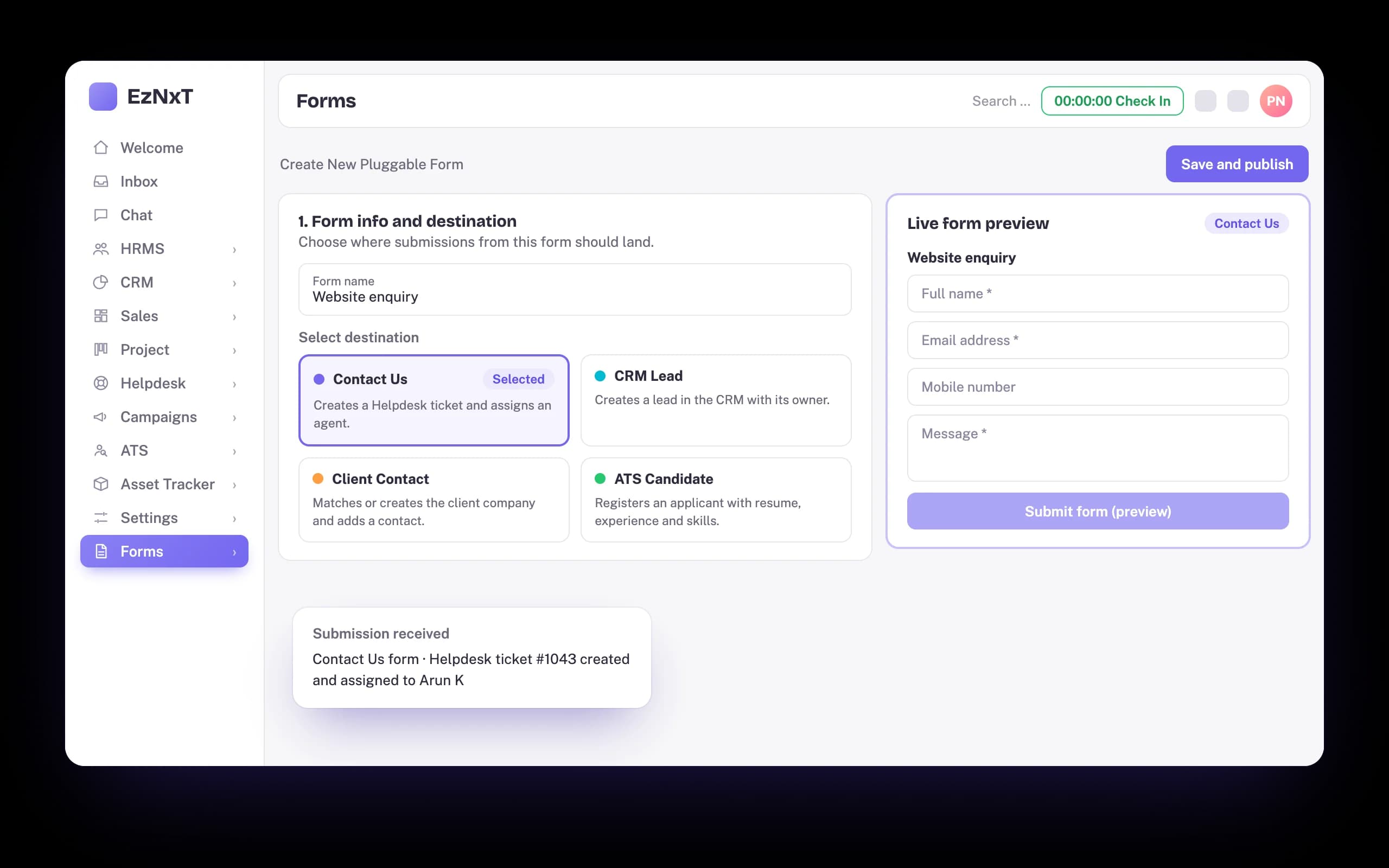
A form creates a Helpdesk ticket, a CRM lead, a client contact or an ATS candidate. Nobody forwards an email or retypes a name into another tool.
An owner from the first second
Each destination has a default inbound owner in your account settings: helpdesk, leads, contacts and jobs. The new record is assigned the moment it arrives.
A link or a snippet
Share the hosted page by WhatsApp, email or LinkedIn, or paste the code into your own site. Embed code comes as HTML, React or Next.js, Vue 3 and cURL.
Spam stopped at the door
A hidden trap field, optional reCAPTCHA, a list of allowed domains, optional email verification, and limits per visitor and per form.
You can see where it came from
The submissions page shows the IP address, the website, whether the email was verified and the full data. Tickets and leads keep the page URL.
Clear about the limits
A form has one destination, and its fields come from a fixed list for it. There are no conditional questions, custom field types or payment forms.
From blank form to live submissions
Five steps. Most of the time goes on choosing the fields, not on setup.
- 1
Name the form and choose where it goes
Give it a name such as Careers quick apply or Website contact us, then pick the destination: Contact us, CRM lead, client contact or ATS candidate. Four starter templates give you sensible fields to begin with.
- 2
Choose and order the fields
Drag fields into the order you want. Set each one to off, optional or mandatory. The candidate destination adds a resume upload and the contact destination adds an attachment.
- 3
Set the safeguards
Turn on email verification and reCAPTCHA if you need them, list the website domains that may send submissions, add the people who should get an alert email, and optionally set a thank you page to send visitors to.
- 4
Check the preview, then save and publish
The live preview beside the builder shows the form as a visitor will see it. Save and publish makes it live.
- 5
Share the link or paste the code
Copy the hosted link, or copy the embed code for your own website. Open the submissions page to watch the first ones arrive.
A form that uses the Contact us destination shows your helpdesk topics, and one that uses CRM lead shows your lead sources, so set those up first if you want visitors to choose between them.
What can EzNxT Forms do for a website that takes enquiries?
Four jobs: build the form, route the submission, publish it safely, and keep track of what came in.
Build the form
Name it, pick where it goes, choose the fields and see the result before anyone else does.
Four starter templates
Careers quick apply, basic contact us, sales lead form and client or partner form, each with sensible fields already on.
Drag to reorder
Put the fields in the order a visitor should meet them. The order is saved with the form.
Off, optional or mandatory
Each field has three levels. A mandatory field shows a clear message by its name when it is left empty.
Resume and attachment uploads
Candidate forms take a resume in PDF or Word format. Contact forms can take an attachment, which is saved with the ticket.
Live preview
A preview sits beside the builder and shows the form with the safeguards you turned on, such as the verification step.
Send each submission where it belongs
The destination decides what is created. Each one also fills in the owner and the details that make the record useful.
Helpdesk ticket
Topic, message, page URL, owner and a deadline in days. The sender is matched to a client contact, client, lead or candidate when one exists.
CRM lead
First stage, lead source, inbound lead owner, medium set to web form, and the page URL and ad click ID kept with the lead.
Client contact
The company is matched by name or created, and the contact person is added with their designation and address.
ATS candidate
Resume, experience, skills and notice period. A candidate who already exists is updated, not duplicated.
Alert emails
List the people who should hear about each submission. With nobody listed, the alert goes to your account’s contact query address.
Publish and protect
Share it the quick way, or build it into your own site, and keep the traffic honest.
A hosted page with a link
A mobile friendly page on EzNxT that you can share by WhatsApp, email or LinkedIn, with no code on your side.
Embed code for your site
Copy it as HTML, React or Next.js, Vue 3 or cURL. Use it on WordPress, Webflow or any page that can hold a snippet.
Email verification
Require a six digit code sent to the visitor’s email before the form is accepted. The submission records that the email was verified.
reCAPTCHA and allowed domains
Check Google reCAPTCHA on every submission and accept the form only from the website domains you list.
Spam handling
A hidden trap field, limits per visitor and per form, a check for text that looks random, and no repeat on a double click.
Manage and review
Every form has a list entry, a submissions page and a record of what changed.
All forms in one list
Filter by keyword, destination, status, owner or manager, and see how many submissions each form has had.
Pause and resume
A paused form shows visitors that it is closed. Resume it when you are ready, and nothing needs to be rebuilt.
Submission inspector
Open a submission to see the IP address, the website it came from, whether the email was verified, the files and the data sent.
Clean, spam or all
Spam is saved but hidden by default. Switch the filter to read it, or search by email, name or IP address.
History of changes
Each form keeps a record of when it was created, changed, paused or deleted, so you can see what changed.
Four teams, four destinations
A clinic, a recruiter, a software firm and a distributor.
A clinic with an appointment enquiry page
The form asks for a name, mobile number, a topic and a message. The topic list is the clinic’s own helpdesk topics. Each enquiry becomes a ticket with the default owner and a deadline in days, and if the sender is already a client contact the ticket is linked to them.
A recruiter with a careers page
A quick apply form asks for the resume, total experience, skills and notice period. New applicants appear in the ATS with the resume attached. A candidate who applies a second time is not duplicated: the empty details are filled in and the new resume is saved.
A software firm with a pricing page
A lead form asks for the company, the position and a message, with a field for how the visitor heard about the firm. The lead arrives in the first stage with the medium set to web form, and the Google click ID that brought the visitor is kept with it.
A distributor with a dealer sign up page
The form asks for the company, the contact person and their designation. If the company is already a client, the person is added to it. If not, the company is created, and the contact goes to the default owner for inbound contacts.
Who EzNxT Forms is for, and who should look elsewhere
For businesses that already collect enquiries, applications or sign ups through their website and want each one to arrive in the right module.
A good fit if
- Companies whose contact page ends in a shared inbox that someone copies from by hand
- Recruiters who want a careers form that creates ATS candidates with the resume attached
- Sales teams with landing pages that should create CRM leads with a source and an owner
- Teams on WordPress, Webflow, React or plain HTML who can paste a snippet or link to a hosted page
Look elsewhere if
- Teams that need surveys, quizzes or payment forms, because every form feeds a ticket, a lead, a client contact or a candidate
- Anyone who needs conditional questions or custom field types, since the fields come from a fixed list for each destination
- Businesses that want duplicate leads merged automatically when the same person fills in a form twice
Where a submission goes after the form
The form is one step. The record it creates is a normal ticket, lead, candidate or client contact.
Form → Helpdesk
A contact form becomes a ticket with a topic, an owner and a deadline, and it is linked to the client contact, lead or candidate who sent it.
Form → CRM
A lead form creates a lead with a source, a first stage and an owner. From there it is a normal lead in your pipeline.
Form → ATS
A careers form creates a candidate with the resume attached, or updates the candidate who is already there.
Form → client records
A client form matches or creates the company and adds the contact person, so the people you deal with are in one place.
Frequently asked questions
Destinations, embedding, spam protection, email verification, submissions, and what is not included.
What does EzNxT Forms do?
It builds a web form that sends every submission straight into the module that should handle it: a Helpdesk ticket, a CRM lead, a client contact or an ATS candidate. You publish it as a link or paste it into your own website, so nobody has to copy an enquiry out of an inbox and into another tool.
Where can I put the form?
On a page that EzNxT hosts for you, which works on a phone and can be shared by link. Or on your own website with embed code. The embed code comes as HTML with plain JavaScript, as React or Next.js, as Vue 3 and as a cURL call. The form accepts a normal browser post, JSON, or an upload with a file attached.
What happens when someone submits a contact form?
A Helpdesk ticket is created with the message, the topic the visitor picked from your own topics, the page the form was on, and an owner taken from your default inbound helpdesk owner. The deadline comes from the number of days set in your account, which is 30 if you have not set one. EzNxT also looks for the sender among your client contacts, clients, leads and candidates and links the ticket to the match.
What does a CRM lead form create?
A lead with the name, company, email, phone, position, city and message the visitor entered, plus any address, website or number of employees you ask for. It starts in your first lead stage, takes the lead source the visitor chose or your default source, and goes to your default inbound lead owner. The medium is recorded as web form, and the page URL and any ad click ID from Google or Facebook are kept with the lead.
How does a client contact form work?
The company name on the form is matched against your existing clients. If the company is there, the new contact person is added to it. If it is not, the company is created first. The contact keeps their name, email, mobile, designation and address, and belongs to your default inbound contact owner.
What happens to a resume sent through a candidate form?
The resume is stored with the candidate, together with experience, skills, designation and the other details you asked for. If the person is already in your ATS, no second record is made. EzNxT fills in only the details that were empty and saves the new resume. New candidates go to your default inbound jobs owner.
How do I keep spam out of a form?
Several layers, each one switchable or built in. A hidden trap field catches simple bots. You can turn on Google reCAPTCHA, limit the form to the domains you list, and require email verification. Submissions are also limited per visitor and per form, text that looks random is flagged, and rapid double clicks are ignored. Anything suspected of being spam is saved and hidden, so you can still read it under the spam filter.
How does email verification work?
Set it to required and the visitor must confirm their email address before the form is accepted. They receive a six digit code that works for five minutes. After five wrong attempts the address is locked out for fifteen minutes. A confirmed address stays valid for thirty minutes, and the submission records that the email was verified.
Who is told when a form is submitted?
The email addresses you list on the form get an alert for each submission, with a subject such as “Priya Nair submitted Website enquiry”. If you list no one, the alert goes to your account’s contact query address.
Where do I see the submissions?
Each form has its own submissions page. Search by email, name or IP address, and switch between clean submissions, spam and all. Open one to see the IP address, the website it came from, whether the email was verified, any attached files and the full data that was sent. The forms list shows how many submissions each form has had.
What is not included?
A form has one destination, and its fields come from a fixed list for that destination, so you cannot add your own question types or conditional questions. A CRM lead form creates a new lead for every submission and does not merge duplicates. The submissions page and the alert email are where you read the data, and there is no built in survey or payment form.
Put the contact form where the work happens.
Pick a destination, choose the fields and publish. The first submission arrives as a ticket, a lead, a client contact or a candidate, with nobody copying it from an inbox.
